显示标签为“CG Pro”的博文。显示所有博文

2019年9月9日星期一

CGDI Prog BMW all key lost For CAS3+/ CAS4+

CGDI prog BMW MSV80 is a good car key programmer for BMW. It supports key programming for BMW cas1/cas2/cas3, and supports key matching and all key lost for cas4 /cas 4+. Here have collected two test reports on CAS3+ and CAS4+ below.

Purpose:
To check if CGDI Prog BMW can program new key to CAS3+/ CAS4+ or not

Test:

Test 1: CGDI BMW add new key to CAS3+ all keys lost- OK
cgdi-prog-bmw-add-new- key-to-cas3+-all-keys-lost-11
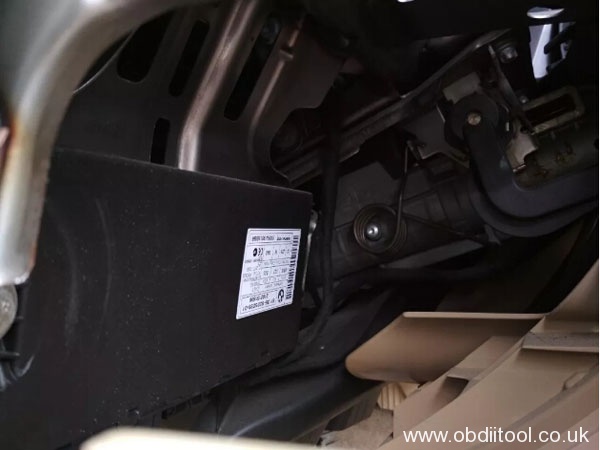
Note: It’s more convenient to work with the cables (DIY by professional technician), no need to dismantle or drill.

Step 1: Click “Read DME ISN” or select the corresponding ECU to read
cgdi-prog-bmw-add-new- key-to-cas3+-all-keys-lost-2


Step 2: Read CAS key info by CGDI prog
Get ISN code and save
cgdi-prog-bmw-add-new3- key-to-cas3+-all-keys-lost-

cgdi-prog-bmw-add-new- key-to-cas3+-all-keys-lost-4

cgdi-prog-bmw-add-new- key-to-cas3+-all-keys-lost-5

Note: Need to downgrade to CAS3

Step 3: Plug the blank into CGDI prog BMW coil
cgdi-prog-bmw-add-new- key-to-cas3+-all-keys-lost-6

Confirm the key is smart key or not
Wait to program the key process completing

Program key success
cgdi-prog-bmw-add-new- key-to-cas3+-all-keys-lost-7


Step 4: Use the new key programmed to test
cgdi-prog-bmw-add-new- key-to-cas3+-all-keys-lost-8


Test 2: CGDI BMW MSV80 add new key to CAS4+ all keys lost- OK
Step 1: Read CAS4+ Immobilizer data by CG PRO 9S12
cgdi-prog-bmw-msv80-add-new-key-to-cas4+-all-keys-lost-1

cgdi-prog-bmw-msv80-add-new-key-to-cas4+-all-keys-lost-2

cgdi-prog-bmw-msv80-add-new-key-to-cas4+-all-keys-lost-3


Note: Don’t forget to make backup before operation.

Step 2: Read engine ECU data with CG-100


Step 3: Program new key by CGDI BMW MSV80


Step 4: Put the new key to learn on BMW car and test it
cgdi-prog-bmw-msv80-add-new-key-to-cas4+-all-keys-lost-15


Result: All success!
CGDI Prog BMW MSV80 key programmer can add new key to CAS3+/ CAS4+ AKL.

2019年8月15日星期四

How to change BMW X1 2010 KM with CG Pro Programmer

How-to: 2010 BMW X1 mileage correction step-by-step using cg pro 9s12 programmer.
Car Model: BMW X1 (imported version)
Year: 2010 model
Instrument tray table: 35080
Guard against theft: CAS3-0L15Y
Device: CG PRO 9S12 programmer
Operation: mileage repair
cgpro-bmw-x1-change-mileage-1
Operation:

1. View specific models.
cgpro-bmw-x1-change-mileage-2

2. Record the original mileage.
cgpro-bmw-x1-change-mileage-3

cgpro-bmw-x1-change-mileage-4

cgpro-bmw-x1-change-mileage-5

cgpro-bmw-x1-change-mileage-6

cgpro-bmw-x1-change-mileage-7

cgpro-bmw-x1-change-mileage-9

cgpro-bmw-x1-change-mileage-9

3. The vehicle power off, remove the instrument module, view the style, determine the storage chip.
cgpro-bmw-x1-change-mileage-10

cgpro-bmw-x1-change-mileage-11

cgpro-bmw-x1-change-mileage-12

cgpro-bmw-x1-change-mileage-13

cgpro-bmw-x1-change-mileage-14

cgpro-bmw-x1-change-mileage-15

4. Remove the CAS module, view the style, and determine the storage chip.
cgpro-bmw-x1-change-mileage-16

cgpro-bmw-x1-change-mileage-18

5. Open the special CGPRO software and enter the corresponding operation interface.
First, clean the instrument chip, place it into the adapter and repair it into the target mileage.
cgpro-bmw-x1-change-mileage-18

cgpro-bmw-x1-change-mileage-19

6. Clean the glue on CAS module, use DB25 adapter wiring, and repair it into target mileage.
cgpro-bmw-x1-change-mileage-20


7. The instrument panel and CAS have been processed and loaded. Some will appear fault code, clear code.
cgpro-bmw-x1-change-mileage-21


8. Reset mileage success.