2020年8月6日星期四

Launch Creader 3001 Update, Using Tips, FAQ, Reviews

This post comes with the user manual of Launch Creader 3001.
launch-creader-3001-update-review-1


Launch Creader 3001 is a professional and cost-effective OBDII/ EOBD code reader. It’s light and portable to use, can be used for EU cars after 2002, USA cars after 1992, Asian cars after 2008 and Japanese cars after 2005. Supports protocol IOS9141-2, IOS14230-4, SAEJ1850, IOS15765-4.

What can Launch Creader 3001 do?
-Read codes
-Erase codes
-I/M Readinees
-Read Data Stream
- Read Freeze frame
-O2 Sensor test
-On-Board monitoring
-Evap-system (mode 8)
-Vehicle informtion
launch-creader-3001-update-review-2


What language does Launch Creader 3001 support:
English, French, Russian, Spanish, German, Italian Portuguese

How to update Launch Creader 3001?
You need to connect the USB cable to PC for device upgrade.
Note: Make sure the computer has an Internet connection.
Step 1: Go to https://en.cnlaunch.com/, search for [cr3001], then enter [Downloads] menu, click on [Update Tools] to download
launch-creader-3001-update-review-3

Step 2: Decompress and install it on your computer (compatible with Windows XP, 7, 8 & 10)
Step 3: After installation, connect one end of the USB cable to the USB port of the computer, and the other end to the Creader 3001 scan tool.
Step 4: Click [Upgrade] to start updating until the update is complete.
launch-creader-3001-update-review-4


How to use Launch Creader 3001?
Step 1: Turn the vehicle ignition on
Note: Vehicle battery voltage range should be 9-18Volts, and Throttle should be in a closed position.
Step 2: Vehicle Connection
1.Locate vehicle's DLC socket: The DLC (Diagnostic Link Connector) is usually located 12 inches from the center of the steering wheel, under or around the driver's side for most vehicles. If the DLC cannot be found, refer to the vehicle's service manual for the location.
2.Connect the diagnostic cable to the vehicle's DLC, the tool will be automatically powered up.
3.The CR3001 scanner is now ready to work.
4.Select [Diagnostic] in Main Menu and press [ok ], then you can perform any function supported.

Launch Creator 3001 FAQ:
Q: What is the difference between the launch Creader 3001 obd2 scanner and the Launch obd2 scanner cr319 code scanner?
A: Creader 3001 and cr319 are all obd2 full test scan tool, support all obd2 10 modes, but launch creader 3001 supports lifetime free update, launch cr319 cannot update.

Q: Will this Creator 3001 scan tool work on Asian cars and truck?
A: Yes, it can work for 12v cars which have 16pin obd2 connector.

Q: Does it tell you more than just the code ? Also does it work on 90's cars?
A: This obd2 scanner launch 3001 can read live data, do O2 Sensor/ Evap System test/ On-Board Monitor / I/M Readiness Test, clear fault codes, read car information. It can work for some 90's cars, but not all.

Q: What kind of Live data does it stream?
A: Creator 3001 can live data of readiness, shrtft22, O2S23 , shrtft23 , lean sensor

Q: Will it work on Mercedes ML350?
A: Yes.

Q: Will this work on a 2016 ford f150?
A: Yes.

Q: Will this launch cr3001 work on my 2010 audi a5 quattro?
A: Yes, it will.

Q: Will this unit work on a 1995 ford f-150 and a 2011 smart car for two?
A: The 1995 Ford is OBD1 and will not read by this device, But the 2011 Smart car will read OK.

Q: Will Reader Work On My2007 Ford Explorer Sport Trac?
A: This will read check engine light codes for any vehicle 1996 and newer.

Q: Can this be used to clear the service engine soon light that came on due to missing gas cap on 2008 bmw 328i?
A: That’s pretty specific, but yes this scanner clears the “P” codes fine on my car. Usually the missing gas cap codes clear themselves once the cap is replaced. If the evap codes remain, it indicates an ongoing leak in the evaporative emissions system. If it’s a different cap, make sure it has a good seal.

Launch Creator 3001 Review:
@Agent K: Works for 2014 Toyota FJ Cruiser
Outstanding! Works great and very easy to use. Has a USB computer cable and port to update via internet if needed.
I also looked at the Creader 4001. I went with the Creader 3001 that Scotty Kilmer recommended. “Rev your engines.”
Be confident in buying.
launch-creader-3001-update-review-5


@antz: Works good
Used a 99 Dodge Durango live data easy to read if you know what you’re looking at
Work on a Ford as well

@Sulaimon Banjoko: Easy to use and works
Used on Toyota corollas 05, 08 and 2010, gave accurate results. Detected a faulty oxygen sensor and could error codes after replacing the faulty sensor.

@Whitworth Family: works great
This item is just as described, WORKS great for my 2013 GMC. and 2013 Hyundai.


@tim: Great buy!
Fantastic value for the money. Did everything claimed. Read DTC codes set on my 06 Ram diesel and erased them. Runs real time data ( rpm, throttle position, MAP, alternator output, coolant temp.etc.etc). So easy to use. Just plug it in. Easy to understand.
launch-creader-3001-update-review-6


@Txborn: Great creader:
My vehicle threw a check engine light on a trip recently and we had to search for an Advance Auto to figure out what was wrong and if we could continue. This would have been great to have in the car...and it will be now. This is a nice compact code reader that works well. Was able to read the codes that caused my check engine light to come on and clear them once I fixed the issue. It's a great value and would buy it again in a heartbeat.

@Mons Veneris: Nice code reader-works good
This is a basic budget-priced OBD2/CAN code reader. Great for diagnosing most automotive engine malfunctions. Great for DIYers. Just don't expect it to read ABS, transmission, TCS, AHS, or other modules codes requiring more sophisticated (and expensive) code readers.

I tried it on my 1996 Chrysler Concorde (OBDII system), and my 2013 Corvette Coupe (CAN system), and it worked fine on both. Remember to turn the ignition ON (with engine off) BEFORE connecting the code reader.

@parq: very usefull
Used the scanner to read my fault codes which seem accurate as I previously paid to have it scanned and lost where I wrote the codes but remembered one that had to do with the catalytic converter. The device seems study, built with solid materials, its lightweight and small so you can keep it in the vehicle easily. I was impressed with all the features it has at such a low price range (windows app for upgrading software, fault code reader and erasing, vehicle data, live data and o2 sensor tests). Would recommend for anybody that wants to have a more concrete diagnostic before visiting the mechanic and for the DIY guys out there.
Used on a ford escape 2008.

I have used it on all of my cars these were: 2 350Z/C7 grandsport/C7 Z51/ GMC Sierra/ Mustang GT/BMW M3/Mercedes CLA/ Cadillac Escalade/Dodge ram 1500/ Hummer H2 so I can confirm it works on American Japanese and German cars it has shown one of my 350Z having a knock sensor issue which it had I didn’t even notice until I wash it I usually do I scan when I wash my car and the Mercedes CLA ABS was malfunctioning which it did when I took it to the dealership thank god for warranty and a misfire for my M3 which I could erase the car would be normal so I can get the spark plug replaced you should only use this to know the problem don’t buy this to fix your problems it won’t by erasing then you’ll end up with more money put in the car use only to see if you can fix the problem if you can’t bring it to the dealership.

@ R. Berry: Save a lot of money by fixing myself
This tool saved me a lot of money by allowing me to diagnose the problem myself instead of going to the dealer or a garage. I turned out the light, ran the car for at least 100 miles and the trouble light never came back. It's paid for itself many times from just one use! (I'll have pics tomorrow) The listing may state that it is for Asian cars AFTER 2008, but it DOES work on my 2003 Toyota Camry, build in Kentucky. So if you have a US built car it may still work!
launch-creader-3001-update-review-7


@TechGuy: Must-have
If you are buying a car from a dealer that you don't trust 100%, then this is a must. You can see how long since the codes (the idiot lights) were reset, and how long it's been driven since that. You get any current issues, code that need more drive time (be suspicious) and real-time readouts. The real-time can test stuff like oxygen sensor, fuel lean/rich as the car is at different revs. It also has a dictionary so the codes can be looked up within the unit for an English description of what the issue is. Worth every penny!

 Launch Creader 3001 CR3001 OBDII / EOBD Code Reader (UK Ship No Tax):

Source:

2020年8月5日星期三

2020 Probes Adapters for Iprog+ Pro/ Xprog M Without Soldering

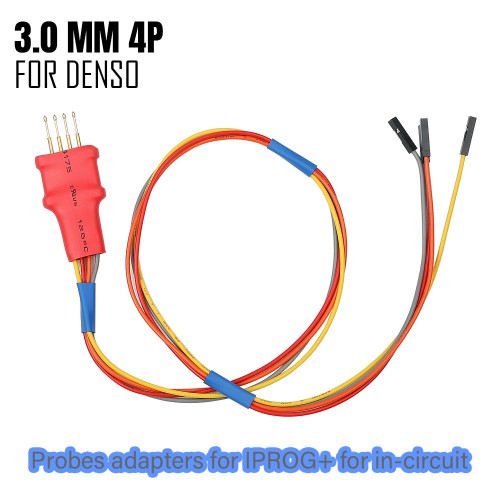
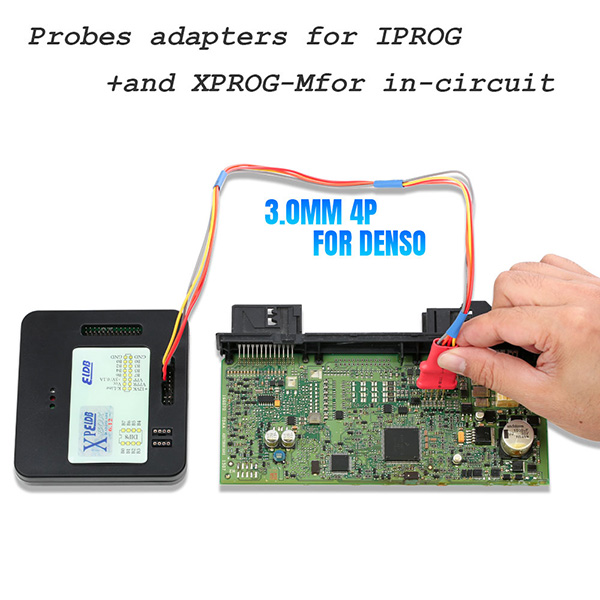
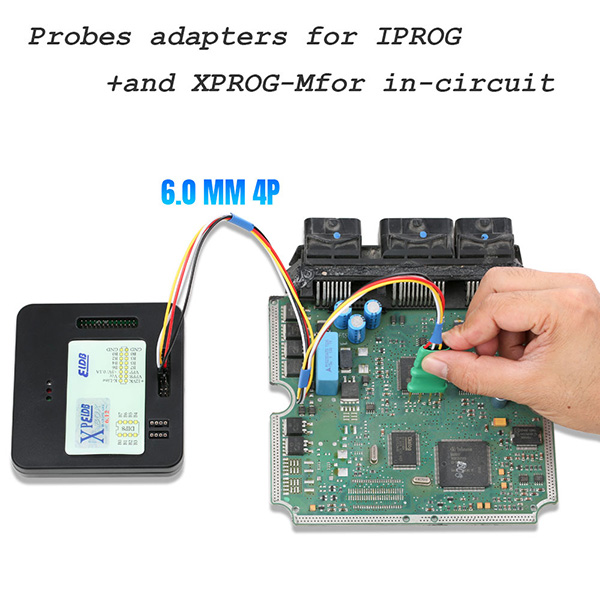
Today let’s talk about new 5 in 1 probes adapters for Iprog+ Xprog-M for in-circuit no need soldering.
It’s same as old probes adapters (item No. SF269), both of them are cheap but have high quality. They are made from different manufacturers, so there is a little difference in the appearance. The 6.0mm probes adapter colors are different.

Check the comparison chart about these two probes adapters (price, appearance):

Product
New 5 in 1 probes adapters
 Old probes adapters
IMG
 
probes-adapters-comparison-1
 
probes-adapters-comparison-2
Item No.
Price
 £17.00
£34.00 (UK ship No Tax)
SOP8
 
probes-adapters-comparison-3
 -
DIP8
 
probes-adapters-comparison-4
 -
2.54mm

probes-adapters-comparison-5

probes-adapters-comparison-6
3.0mm
 
probes-adapters-comparison-7
 
probes-adapters-comparison-8
6.0mm
 
probes-adapters-comparison-9
 
probes-adapters-comparison-10

The two probes adapters above can work with both iprog+ programmer and Xprog Box programmer, which can make your work much easier without soldering.

5 in 1 probes adapters for iprog+ connection diagram:
SOP8 with iprog+ pro clone

5-in-1-probes-adapters-iprog+-xprog-1

DIP8 with iprog+ pro clone
5-in-1-probes-adapters-iprog+-xprog-2

2.54mm with iprog+ pro clone
5-in-1-probes-adapters-iprog+-xprog-3

3.0mm with iprog+ pro clone
5-in-1-probes-adapters-iprog+-xprog-4

6.0mm with iprog+ pro clone

5-in-1-probes-adapters-iprog+-xprog-5


5 in 1 probes adapters for Xprog Box ECU programmer connection diagram:
SOP8 with Xprog-M
5-in-1-probes-adapters-iprog+-xprog-6

DIP8 with Xprog-M
5-in-1-probes-adapters-iprog+-xprog-7

2.54mm with Xprog-M
5-in-1-probes-adapters-iprog+-xprog-8

3.0mm with Xprog-M
5-in-1-probes-adapters-iprog+-xprog-9

6.0mm with Xprog-M
5-in-1-probes-adapters-iprog+-xprog-10


In a word, 5 in 1 probes adapters for Iprog+ for in-circuit (item No.SF269-B) is cheaper than item No.SF269, but SF269 can be shipped from UK. They are worth to purchase. Just select anyone depends on your actual need.

5 In 1 Probes adapters for IPROG+ and XPROG-M for in-circuit:
[UK SHIP] Probes adapted for IPROG+ XPROG-M for in-circuit ECU:

Related posts:
Probes Adapters For IPROG + V82 / XPROG User Guide Manual
Free Download iProg+ Pro Clone Software V84, V82, V80, V77, V76, 100% Works
Free Download Xprog Software 6.12 5.84, 5.74, 5.60, 5.55, 5.51, 100% Works

2020年8月4日星期二

V2020.08 BMW ICOM Software Newest Update for BMW ICOM A2/NEXT (100% Works)

Newest BMW ICOM software V08.2020 has been verified to work with BMW ICOM A2+B+C and BMW ICOM NEXT diagnostic tools.
V2020.08 BMW ICOM software Update info:
ISTA-D 4.24.13
SDP Programming Database 4.24.12, Multilingual
VIN: 2020.06.08
ISTA-P 3.67.1.000 ,
BMW ETK  2019.12
BMW KSD  2019.11
INPA 5.00, winkfp 5.2.3, NCS 3.5.1
BMWAi Refresh Hidden 4.6
E-SYS V3.30 and V3.30, database V67.0, Chinese version software added
DR.GINI B020
The latest FSC navigation code software and IBAC coder
Added DISV57 and DISV44 for old BMW cars, diagnostic and programming


Supported languages: English, Dutch, French, German, Italian, Japanese, Korean, Polish, Portuguese, Russian, Spanish, Swedish,
Thai, Turkish, Czech, Indonesian, Greek, Traditional Chinese, Simplified Chinese


If you want to change ISTA language, please open the [ISTA language install] folder in the software installation kit and select the language you want
to run.


When the language is installed successfully, open ISTA+ again, and then you will see the language you desire has been changed.

Operation system requirements:
Win7 system
Dual-core processor, better I3 above, over 4G of memory

Select V2020.08 BMW ICOM SSD or 500G HDD depends on your actual need.
SSD with high quality (£105.00):
https://www.obdiitool.co.uk/wholesale/v202008-bmw-icom-software-ssd.html
500G HDD with good price (£56.00):
https://www.obdiitool.co.uk/wholesale/202008-bmw-icom-software-hdd.html

See also:
V2020.05 BMW ICOM Software Update for BMW ICOM A2/ NEXT
http://blog.obdiitool.co.uk/v2020-05-bmw-icom-software-update-for-bmw-icom-a2-next/
How to Change Language of V2020.03 BMW ICOM ISTA+
http://blog.obdiitool.co.uk/how-to-change-language-of-v2020-03-bmw-icom-ista/
How To Solve BMW ICOM NEXT A+B+C Cannot Find IP Address?
http://blog.obdiitool.co.uk/solve-bmw-icom-next-abc-cannot-find-ip-address/

Source:
http://blog.obdiitool.co.uk/bmw-icom-software-update-for-bmw-icom-a2-next-100-works/

2020年8月3日星期一

Compare Creator C310+ BMW Code Reader for which one is better?

Do you think of  buy a new Creator C310+ code reader to work for your BMW cars?
I want to say it’s a cost-effective and professional multi-system scan tool. It not only can support basic diagnostic functions, but also be available with many special functions for BMW from 1997 to 2019. Go ahead to learn more details.

1.Creator C310+ vs. Creator C110+:
Item
IMG
 
creator-c310+-bmw-review-1


creator-c310+-bmw-review-2
Price
 £46.00 (UK ship No Tax)
 £37.99 (UK ship No Tax)
Software version
V11.7
V6.2
Online update
Yes, update for free for life
Language
English, Chinese
English, German, Chinese
Car list
Supports BMW cars from 1997 to 2019
1 series: 1'_E81/E82/E87/E88,1'_F20/F21
2 series: 2'_F22/F23,2'_F45/F46,2'_F87
3 series: 3'_E46,3'_E90/E91/E92/E93, 3'_F30/F31/F34/F35,3'_F80
4 series: 4'_F32/F33/F36,4'_F82/F83
5 series: 5'_E39,5'_E60/E61,5'_GT(F07), 5'_F10/F11/F18
6 series: 6'_E63/E64,6'_F06/F12/F13
7 series: 7'_E38,7'_E65/E66,7'_F01/F02/F03/F04, 7'_G11/G12
X series: X1_E84,X1_F48/F49,X3_E83,X5_E53,X5_70,X6_E71, X6_E72,X3_F25,X5_F15/F85,X6_F16/F86,X4_F26
Z series: Z4_E85/E86,Z4_E89
I series: I'_I01/I02
MINI:     MINI_R50/R52/R53, MINI_R55/R56/R57/R58/R59/R60,  MINI_F55/F56

Supports BMW cars from 1997 to 2019; With MINI Cooper test function
1 series: 1'_E81/E82/E87/E88,1'_F20/F21
2 series: 2'_F22/F23,2'_F45/F46,2'_F87
3 series: 3'_E46,3'_E90/E91/E92/E93, 3'_F30/F31/F34/F35,3'_F80
4 series: 4'_F32/F33/F36,4'_F82/F83
5 series: 5'_E39,5'_E60/E61,5'_GT(F07), 5'_F10/F11/F18
6 series: 6'_E63/E64,6'_F06/F12/F13
7 series: 7'_E38,7'_E65/E66,7'_F01/F02/F03/F04, 7'_G11/G12
X series: X1_E84,X1_F48/F49,X3_E83,X5_E53,X5_70,X6_E71, X6_E72,X3_F25,X5_F15/F85,X6_F16/F86,X4_F26
Z series: Z4_E85/E86,Z4_E89
I series: I'_I01/I02
MINI:     MINI_R50/R52/R53, MINI_R55/R56/R57/R58/R59/R60,  MINI_F55/F56

System
Drive , Chassis and Body all system
all systems
Diagnostic
1.Read trouble codes
2.Erase trouble codes
3.Display live data stream
4.Clear adaptation
5.Engine oil reset
1.Read trouble codes
2.Erase trouble codes
3.Display live data stream 
4.Clear adaptation
5.Show vehicle version information
Special function
Yes
 1.Engine Oil Reset
 2.Diesel particle filter(only E chassis)
 3. Front brake
 4.Rear brake
 5.Brake fluid
 6.Microfilter (only E chassis)
 7.Spark plugs(only E chassis)
 8.Vehicle check(only E chassis)
 9.Coolant
 10.Vehicle inspection
 11.Exhaust emission inspection
No

In conclusion:
Though C110+ is cheaper than C310+, but C310+ BMW supports more functions incl. special function while C110+ cannot support.

2.Creator C310+ BMW Software Update:
It’s easy to update for free for life via USB cable. Just follow the step-by-step guide as below to operate.
Step 1: Visit official website: www.szcreator.com to download [C310+ software]
Select the corresponding language version depends on your need
When download the software successfully, unzip it and you will get a BIN file, remember the save path.

creator-c310+-bmw-review-3


Step 2: Connect C310+ code reader with your computer via USB cable
Step 3: Download [C310+ update tool]
Unzip and install the C310+ update tool
Finish installation
Run Creator C100 application
Click on [Update] button
creator-c310+-bmw-review-4

Select the C310+ software BIN file in step 1
Click [Open] to update till the process is completed
creator-c310+-bmw-review-5


3.Creator X310+ BMW Customer Reviews:
@ JohnnyBgood
It works for air bag and service lights, for real!
I have a 2004 330ci coupe and had a Service Engine Soon and Airbag Light on. I received this scanner and literally bypassed the instructions, plugged it in, ran diags and found my problems within minutes. I reseated a cable for the sevice code and recognized the Airbag code was due to previous repairs and did not reset. I was able to delete all codes, restarted the car and the annoying dash lights were gone. I asked the shop to run the codes for me when they changed my oil and they said it would be a couple hundred bucks just to hook the car up for diagnostics. I immediately ordered this tool and I am happy to report that it saved me time, money and gave me a piece of mind knowing exactly what was wrong with my car. Very easy to use.
creator-c310+-bmw-review-6

creator-c310+-bmw-review-7


@ChuckG: Great Reader for my R55 Clubman S Mini Cooper!
I had purchased another scan tool to read error codes for my 2009 Mini Cooper Clubman S. While it read errors, it didn't read/output the errors particular to my car.

I purchased the Creator C310 Plus C310+ Code Scanner for BMW Mini, and it read all the codes specific to my car. It was easy to designate the Make/Model because it reads various BMW/Mini models, including my Clubman S.

While I can do basic maintenance and repairs to my car, some of the electronics and smaller quirks of the mini can be hard to fix. Because the Creator V8.0 C310 Plus C310+ Code Scanner for BMW Mini worked well, I was able to read some ignition errors I was having before taking my car to get fixed at the dealer. The codes were confirmed, and because of this, my advisor said it was easy to get in and get my car fixed without extra diagnostic time.

@Mr. Gadget: Great Addition to the tool box.
I have a couple of OBD2 Code Scanners. They are great for generic codes but were useless reading some of the codes on my 2016 Mini Cooper. Specifically, the SRS codes. While repairing the heating element in the driver's seat, I turned on the ignition with the cable harness disconnected from both seats. That trips an error that there is something wrong with the side airbags. That error can only be cleared with a reader that can read the error code. My existing reader couldn't read or reset the codes. This C310+ reader can. That saved me a trip to the dealer and the labor cost involved.

Well worth the investment.

@Aaron: Worked on my R53 Mini (including airbag!)
I bought the C310+ because it wasn't much more than the C110, and reviews stated it had more features. The unit came with 8.0 firmware, so the first thing I did after taking it out of the box was navigate to the szcreator.com website for an update. I downloaded the UpdateTool and the 11.7 firmware and proceeded to update the unit. Warning, this takes about 20-30 minutes to complete!

I headed out to the car, plugged the unit in and off I went. The auto detect was unable to determine what it was plugged into, so I selected Mini, then the R53 for my vehicle. I had an airbag light on from having the battery disconnected for a month for repair, so I worked my way through the menus, found the SRS menu, and read the codes for the airbag. It immediately found the code and I made note of it. I then cleared the airbag codes, and it was fast and no more airbag light after the first try.

I then went to check the ECU and Powersteering for codes, but there weren't any, so nothing more to clear. I was able to read the data stream for many parameters, which will be helpful when doing modifications or maintenance to the vehicle.

Overall, this unit worked very well for me, and it was a very cost effective purchase. The menus are a little clumsy, so it takes a little bit to work your way through them.

@JCL: my 2005 x3 MT got the 4x4, brake, tire pressure, and abs lights!
Well.... i got those lights all at once. The car didnt have ABS, 4x4, not even cruise control. The culprit: the rear right abs speed sensor! the c310 showed that it wasn't even registering the speed, a mechanic charged me $140 for the part and labor: I just went there and told him what to replace, he plugged in his fancy wireless tablet-computer reader to my car and he got exactly the same screens as my humble c310. He did agreed with my prognosis... but still he was trying to tell me I needed a new axle, I'm pretty sure that without the knowing before hand what was wrong i'd have to spend some serious $$ to fix my 15 years-old 213,000 miles car.

@Jay Chevalier: Must have tool, does the job of more expensive tools.
This a very inexpensive must have for a BMW owner. Resets SRS, airbags, and many different function most tools in this price range don't cover. I have heard you can buy for a cheaper price but then all the prices were $8-$10 for shipping. I do all my purchases with Prime so I received this creator c310+ sooner and was immediately able to diagnose, clear codes and fix problems. Plenty of videos on how to use, reviews and praise. I don't even use my other scan tool for my BMW Z4 now because this has more info and diagnoses and clears more codes. Probably does way more functions than I know how to perform.

Where to buy V11.7 Creator C310+ BMW Multi System Scan Tool?
You can buy C310+ ship from UK No Tax!

Source: