2020年5月15日星期五

VAS6154/ 5054A ODIS 5.26 Software Download Free & Install

Newest ODIS software V5.26 has been tested ok to work well with VAS6154 and VAS5054a.
Here share the free download link and installation guide for reference.

Part 1: Free download ODIS 5.26 Postsetup 98.0.160
torrent 1
https://mega.nz/file/MQRHWCxa#KgHLLAOCi23WqW_6PhO21Xuuu9db7ztnI_dl3i8HMEM
0.MS_Visual_C++2010 for W10
0.Prerequirements x64 W7
0.Prerequirements x86 W7
1.OffboardDiagSetup-Service_VWMCD_5_2_6-B52_6_0_2
2.ODIS-S 5.2.6 Patch+License-Full After Unrar this the password for the 7zip archive is as always fantomel
3.PDU-API_fix_x86+x64 for W10
5.Bad VAS5054A Patch
5a.Softing_PDU-API_1.20.42 for clones
EN SFD-Manual for UMB.pdf
EN Windows 7 Announcement UMB.pdf
supportnews-en.pdf
Torrent 2
4.ODIS-Service_update_5_2_6-EU_20200317_98.0.140
https://mega.nz/file/UYYjzaQZ#kZZVPDkYkcsHLncU5LA_kkJ0BeqyFsSh5OADqayJNOw
Torrent 3
ODIS-Service_update_5_2_6-EU_20200330_98.0.160
https://mega.nz/file/cNIFkCpZ#pQIJ9IjNZDW4ssa3KFl1s2HhjreAv1SqFJ7ROtgaSuA
Torrent 4
4a.ODIS-Service_update_5.1.6_v89.5.520 to 5.2.6-EU_20200303_96.0.10
https://mega.nz/file/8AQXjA5Z#uoieG-AwhhMxEerjeMGoWcN01dfl-h4drls38FV0U_c
Torrent 5
4b.ODIS-Service_update_5.1.6_v89.5.520 to 5.2.6-EU_20200317_98.0.140
https://mega.nz/file/UMJnTC5R#tTMDCHP6zpFrJ6CaMmAIFMPgFqGcmW38nGKYA4c9Jkw

Win10-VAS5054-ODIS-S-526:
https://mega.nz/file/7YFSnK6a#hEWrlS6QKStccFJ_pokawY9TIVgekvjUcv9g4JfxCWY

ODIS 5.26 software overview:
(1)ODIS Software Version: 5.26 for Full Brand till 2019.12 (also includes 5.16 for each brand till 2019.8)
(2)ETKA: 8.0 (2018.11)
(3)Elsawin: 6.0 (2016.1)
(4)ODIS Engineering: 11.0
(5)VCDS Software Version: 19.6.2
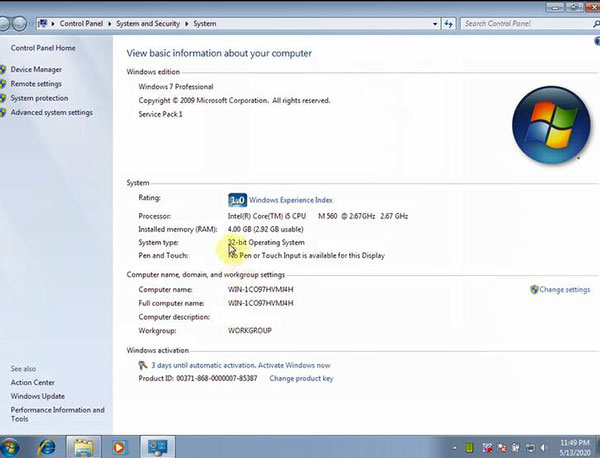
(6)OS System: Win7, Win10 32bit/ 64bit
(7)Multi-Languages: English, German, French, Spanish, Korean

(8)Support Vehicles: VAG Group includes Volkswagen (Shanghai VW, FAW-VW, VW Commercial Vehicles etc.), Audi, Lamborghini, Bentley, Skoda, Seat, Bugatti, MAN total 11 brands.
(9)Compatible Hardware: VAS5054A, VAS6154A
Part 2: VAS 5054A, VAS6154 ODIS 5.26 Install on Win7 32 bit:
The installation steps are same for VAS5054a and VAS-6154.
It will take a long time to copy the 5 software from DVD to the local disk of computer, please keep patient.

Step 1: Update windows system depends on your need

Step 2: Install OffboardDiagSetup-service_VWMCD_5_2
Select the language you want

Choose target folder

Select diagnostic interface: VAS5054 or VAS6154

Search license


Complete setup

Step 3: Copy the offboardDiagLauncher from local disk to program files (x86)
Step 4: Run Offboard Diagnostic information system as administrator

Click keygen
Get the hardware ID and name from Registration Dialog to input in the corresponding positions in the Keys Generator
Then obtain the registration key and paste to Registration Dialog to register


Input Postsetup configuration data
URL: Click “Select local directory” to choose
User name: abc
Kerword: abc

Select the corresponding language
Download odis data
Restart computer

Step 5: Copy ODIS 5.26 patch to C disk

Start to diagnose
VAS5054A ODIS 5.26 install video:

VAS6154A ODIS 5.26 install video:

WiFi V-A-S 6154 Diagnostic Tool with ODIS 5.2.6 Software for VW Audi Skoda:
http://www.obdiitool.co.uk/wholesale/vas-6154-for-vw-audi-skoda.html
Source:
http://blog.obdiitool.co.uk/vas6154-5054a-odis-5-26-software-download-free-install/

2020年5月14日星期四

Reset ABS BLEEDING on 2015 Chevrolet Suburban by Launch ThinkDiag

It’s tested ok to reset ABS bleeding for 2015 Chevrolet Suburban using Launch ThinkDiag OBD2 diagnostic tool.
Car: 2015 Chevrolet Suburban (light duty truck)

Device:Launch THINKCAR ThinkDiag OBD2 full system code reader

http://www.obdiitool.co.uk/wholesale/thinkdiag-obd2-full-system.html
Procedures:
Install ThinkDiag APP on Android or IOS smart phone
Plug the ThinkDiag device into OBDII port in your vehicle until the green light appears
Turn on the ignition
Run ThinkDiag APP
Press the second icon at the bottom left of the APP screen to enter ThinkStore page


Press “…” to show full purchased software


There are two ways to reset ABS bleeding:
1.Select GM car make


2.Select RESETBLEED function


Here we choose the No.2 method to operate
Connect Bluetooth automatically
Select car manufacturer: GM


Make sure turn on the ignition switch
Pay attention to the info:
If the first bit of the VIN is the L letter, please select path: CHINESECAR->SGM
Press [OK] enter GM software
Press [Cancel] exit
Just press OK to continue-
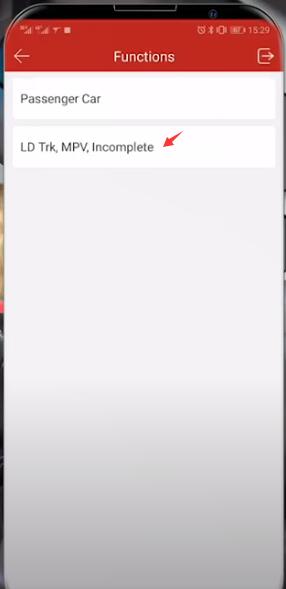
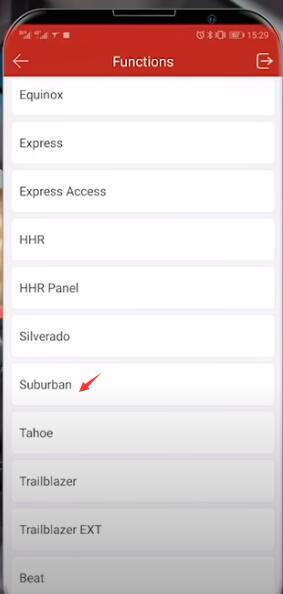
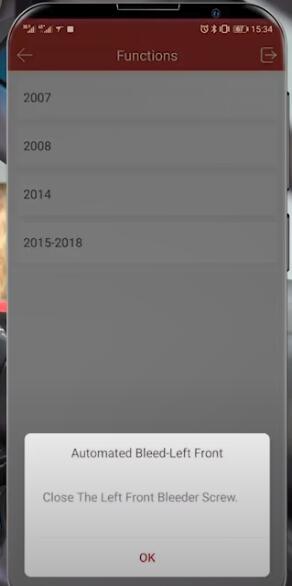
Tap Manually Select (Via Model)-> LD Trk, MPV, Incomplete-> Chevrolet Truck-> Suburban-> 2015-2018
And it will read out the car year


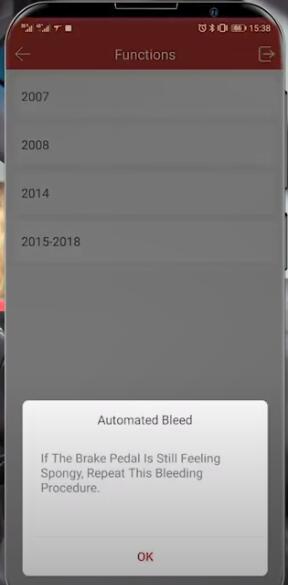
The ABS bleeding reset instructions will display on the screen, just follow it to operate:
1.To perform the automated bleed and vehicle learn procedures. Follow the service manual and equipment manufacturer’s instructions.Connect the required brake bleed equipment Connect battery charger to 12V battery Turn ignition on Place transmission in the Park or Neutral position. Note: ignition must remain in the run position during the entire process.
2.Connect bleeder ball to vehicle and set to 300 kpa. Note: Do not open any bleeder screw until instructed.
3.Stop vehicle. This test cannot be run while moving Configuring brakes bleeding system!
They’re sending pressure through the line to clear out all the air, you’re going to hear this about four separate times so it’s going to happen on the front right and then front left, back right and back left.


The notification is letting us know that the traction control was on and off


Once clear all four of these in that notification will be gone
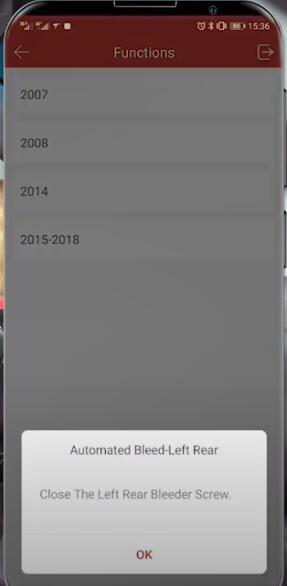
Follow the prompts to reset automated bleed-left front/rear, bleed-right rear


Finish resetting ABS bleeding


Check more car models which can work with Launch ThinkDiag, please visit the official website: https://www.mythinkcar.com/coverage/checklist.
It’s very easy to do. Just select the corresponding product, car manufacturer, model and year to search directly.
That’s all!
Source:
http://blog.obdiitool.co.uk/reset-abs-bleeding-on-2015-chevrolet-suburban-by-launch-thinkdiag/

2020年5月13日星期三

Ford VCMII IDS V101 FAQs

Ford VCM II with latest version V101 comes with multi-language. It not only can read and clear diagnostic trouble codes, but also provides full dealer diagnostic capabilities for most 16 pin Fords, including all new 2020 Ford vehicles. Here have collected some frequently asked questions below. Hope it helps!

Q: Can Ford VCMII IDS V101 support Ford F150?
A: Yes, it can.

Q: Does VCM2 Ford V101 support 2004 ford ranger?
A: Yes.

Q: Can ford vcm 2 support ford Transit 2018?
A: Yes.

Q: Does Ford vcm2 support Ford Falcon (AU) from 2002 to 2005?
A: Yes.

Q: Can vcm2 support BCM module replace?
A: Yes.

Q: Can VCM2 software work on Win10?
A: It should be ok. Some customers installed it successfully on Win10. Win7 is better to install.

Q: I want to IDS FORD to do many functions, such as program keys, bcm modules, program flash modules off 2018-2017 year. Which tool or software can support?
A: Ford VCMII IDS V101 + original GM online subscription.

Q: Does VCM2 for Ford IDS V101 support reprogramming of the TCM on the 2008 Lincoln MCX?
A: Yes.

Q: Which software comes with VCMII IDS V101 package?
A: Only v101 software in the CD.

Q: I want to do diagnose ford fiesta,ford transit custom, euro 6 diesel 2017 and above, which tool is recommended to use?
A: VCMII FORD.
Q: What’s the difference between Ford VCMII IDS V101 and VCM II 2 in 1 Ford V116 diagnostic tool?
A: Ford VCMII IDS V101 is more stable to do ECU programming than VCM II 2 in 1 Ford V116. Other functions are same.

Q: When finish installing VCM2 for Ford IDS V101 and start to use, it pops up “trial period has expired”, how to solve?
A: Please modify the date to software version date.

Q: I bought a ford vcm ii in 2016. It worked well before. But when I change a new Windows 10 computer, and install virtual machine and software, the device failed to use. It cannot communicate with computer and the green light is not on.
A: Please check whether the all the device drivers have been installed well or not.
More diagnostic tools:
http://www.obdiitool.co.uk/
Source:
http://blog.obdiitool.co.uk/ford-vcmii-ids-v101-faqs/

2020年5月11日星期一

Xhorse Toyota 8A All Key Lost Adapter User Manual 

This post comes with the user manual of Xhorse Toyota 8A Non-smart key all keys lost adapter.
Part 1: Xhorse Toyota 8A All Key Lost adapter function
Part 2: Xhorse Toyota 8A All Key Lost adapter vehicle coverage
Part 3: Xhorse Toyota 8A all keys lost adapter how to use
Part 4: Xhorse Toyota 8A all keys lost adapter FAQs
In detail…
Part 1: Xhorse Toyota 8A All Key Lost adapter function
Xhorse Toyota 8A Non-smart key adapter for all keys lost, works well with VVDI2, VVDI Key Tool Max& Mini OBD tool without dismantling the IMMO box.


Note: the Toyota 8A adapter cannot be used alone, needs to work with VVDI2 or key tool max.
Part 2: Xhorse Toyota 8A All Key Lost adapter vehicle coverage
Xhorse Toyota 8A Non-smart key adapter supports Toyota 8A H chip (non-smart) all keys lost from year 2014 to 2019 via OBD, without disassembling Immobilizer box, incl. Levin, Corolla, Rav4, Prado, Land Cruiser, Camry, Highlander, Reiz and Sienna.
Part 3: Xhorse Toyota 8A all keys lost adapter how to use
Here is the full package including platform adapter, OBD connector and harness adapter.


Platform adapter with harness adapter can be directly connected to the transfer box to add key on the platform, as well as reset the anti-theft box.


If we operate in the car, work on bench without disassembling it. It doesn’t need to remove the anti-theft box. We need to connect platform adapter with OBD connector. OBD connector with car OBD
The positive and negative red and black clips of the battery to the positive and negative


The blue short connector is clamped on the car’s ignition switch No.2 relay


OBD connector connected to the car
The long blue connector is connected to the ignition switch contact switch plug on


This specific operations and connections are opened below.
1.Preparation:
Step 1: Find the fuse box on the car and open it
Note: Different models have different fuse positions and relay box positions

Look for the No.2 ignition switch according to the position on the fuse box


And unplug the relay

Step 2: Remove the protective shell
Exposing the ignition lock
There is an inductive contact switch line on the ignition lock, unplug it

There is a two-pin cable on this plug. After a while, you need to insert the long blue plug on it.

The preparatory work has been completed
2.Connection:
This OBD is connected to the device

This OBD connect with the car


Two power clips are clamped on the battery

Make sure take away the red positive electrode


The positive and negative poles are champed in the corresponding positions
The blue short is connected to the position of the No.2 ignition switch relay

OBD port connect with the car

This is connected to VVDI2 or Key tool Max

Connect the long blue signal wire to the contact switch wire

Then connect the 8A adapter to VVDI2 key programmer


Insert the key without the chip into the ignition switch
Punch it


Put the super chip into VVDI2 coil


3.Run VVDI2 software
Enter the VVDI2 software transponder programmer
Click “OBD Make master key directly”

When communicating, the system dashboard will automatically light up
Reading anti-theft…
The instrument light on the car will flash
Follow the prompt to put the super chip into the VVDI2 antenna and click OK

If have already put it in, just click OK to continue
Writing to chip
Note: It needs to calculate online, so you need to connect to the Internet when operating.
Generate the master key chip successfully


Disconnect the thread and recover the vehicle removing
Put the chip into the key
Then insert the key into ignition switch to turn on, start normally

Part 4: Xhorse Toyota 8A all keys lost adapter FAQs
Q1: What tool can be used to this connector to car key programmer?
A1: VVDI2 or Key Tool Max+ Mini OBD Tool.
Q2: Toyota 8A Non-smart Key Adapter can work with VVDI2. Are there any requirements for the license of Xhorse VVDI2? Can the VVDI2 basic version also be used?
A2: It doesn’t need any token or authorization. The basic version is also supported.
Q3: Even without vvdi2 i can use it with mini obd tool?
A3: Yes.
Q4:  What years would this work on?
A4: It works on all years.
Q5: Toyota Aygo 2015 System H all keys lost. Does this computer program the chip? Hilux? Hiace?
A5: Yes, it does. No problem for Toyota Hiace and Hilux (2015-2019 IMMO box)
Q6: What kinds of key can be supported? Proximity or just keyed?
A6: Not smart key. Just key.
Q7: What versions of modules IMMO H supports? 
A7:  IMMO box F3-F4-K6-S6
Q8: Is this used to program toyota H immo box on bench?
A8: Not on bench. On car via obd, no need to dismantle the dash anymore. With vvdi2 new software + key tool max, you can read immo data and make keys directly to IMMO or other option is barracuda and tango on bench.
With this set must be on car because there is a connection to fuse box and obd and ign coil.
Q9: Possible to program smart key Land cruiser after 2016?
A9: Yes, it will.
Q10: Does this need a subscription for Toyota or is this a bypass?
A10: Bypass.
Q11: Does it support new 2020 Toyota keys?
A11: Yes.
Q12: Does a programmer of the degree need hello besides this adapter?
A12: The adapter cannot be used alone. It should be work with vvdi2 or key tool max+ mini obd tool.
Q13: Can it be used simultaneously with a barracuda?
A13: No. Barracuda is a ecu programmer. The adapter requires a OBD programmer to program key.
Get XHORSE Toyota 8A Non-smart Key Adapter for All Key Lost No Disassembly:
http://www.obdiitool.co.uk/wholesale/xhorse-toyota-8a-adapter.html
 Source:
http://blog.obdiitool.co.uk/xhorse-toyota-8a-all-key-lost-adapter-user-manual/